Search
Zettelkasten
Started by Niklas Luhmann, also called “Slip Box”. This approach will further dilute the idea of a librarian who organizes books in main categories and sub-folder and focuses only on the thought at hand as an individual note. Instead of spending lots of your brainpower on which folder to put a specific note in, you start creating it in one folder for all and linking them together. Usually, you wouldn’t have any structure in these concepts, but I combined the two methods into my Second Brain. You also see in the above design under 💡 Resources/🗃 Zettelkasten I have its folder.
# Zettelkasten Method
The Zettelkasten method is a personal strategy process for thinking and writing. Similar to the Second Brain, It helps the daily consumed overload of data. It does not only help to store and organize knowledge but also improves your memory and knowledge retention. The Zettelkasten method is suitable for when you want to systematically organize vital information, find the information again, even years later, and develop your ideas.
# Fleeting Notes
In a Zettelkasten, we talk about three main types of notes. Firstly you start with Fleeting Notes, which are quick, informal notes on any thought or idea that pops into your mind. They don’t need to be highly organized, and in fact, shouldn’t be. They are not meant to capture an idea in full detail but serve as reminders of what is in your head.
# Literature Notes
The second is Literature Notes. Niklas Luhmann would write them down on index cards with the bibliographic details on the back. Each contains the main point he didn’t want to forget or thought he could use in his writing.
Sönke Ahrens offers four guidelines for creating literature notes:
- Be highly selective in what you decide to keep
- Keep the overall note as short as possible
- Use your own words instead of copying quotes verbatim
- Write down the bibliographic details on the source.
# Permanent Notes
This third step starts with looking through the first two kinds of notes that you’ve created: Fleeting Notes and Literature Notes. Permanent Notes are the last and most important ones. They make up the long-term knowledge that gives the Zettelkasten its value. As you go through them, think about how they relate to your research, current thinking, or interests. The goal is not just to collect ideas but also to develop arguments and discussions over time. If you need help jogging your memory, look at the existing topics in your Zettelkasten since it already contains only things that interest you. Ask yourself open questions to deepen your thinking and bring you outside your comfort zone thinking.
Delete fleeting notes after rewriting
Once this step of rewriting in your own words is done: Throw away (or delete) the fleeting notes from step one and file the literature notes from step two into your bibliographic Zettelkasten.
# Why This Approach
This approach needs time to get used to, and I’m still in its progress. But I can already feel considerable power, and I’m starting to put all my notes in my Zettelkasten folder, except for the ⚛️ Areas folder where repeated things come in, such as family, health, work, etc. and 📬 Inbox where any notes get put into as first before being moved to Zettelkasten or Areas.
It saves me a lot of time, while as a Swiss, I’m very organised and want to structure. The Zettelkasten helps me to focus on the content instead. It also gives me a relaxed state if I write something down quickly without too much thought, that I will organically find it later when needed or when I go through my open loops in my Inbox. Which most often sparks new ideas and starts my connected thinking yet again from another angle.
Tool of Choice
I use Obsidian for linking my thoughts in a full Zettelkasten manner. More on that read How to take notes in 2022.
# Keeping Your Life Organized
The method is a personal strategy process for thinking and writing. It helps the daily consumed overload of data. Does not only help to store and organize knowledge but also improves your memory and knowledge retention. The Zettelkasten method is good for when you want to:
- Systematically organize important information
- Find information again, even years later
- Develop your own ideas
Zettelkasten method comprises three main types of notes:
Niklas Luhmann started with the Zettelkasten or also called Slip-Box because he rejected the way of storing his thoughts and notes in an alphabetical categorization way. Therefore he started a research “database” made of index cards (Zettel) that were thematically unlimited and extended to infinity in any direction.
The system work as he writes down potentially useful ideas he encountered while reading on a small slip card. One idea per slip card. He links them if they are on the same topic or branch if it’s new ideas. As he read books or whatever, he would create new notes, update or add comments to existing cards or create new branches/links along the way. Each new note has a unique id.
How I use my Zettelkasten I described in My Zettelkasten Workflow, Personal Knowledge Management Workflow for a Deeper Life and My Obsidian Note-Taking Workflow.
# Smart Note Taking
A key part in this all is to take smart notes as Sönke Ahrens writes in his book How to Take Smart Notes (Sönke Ahrens). Without being delivered what you note down, everything will seem important, and it’s more of a chore than a help.
# Other Peoples Zettelkasten Workflow
# Neovim Approach (Up and Down Linking)
Loved the Neovim approach here: My Super-Simple Approach To a Zettelkasten Knowledge Management System - YouTube
My comment from watching it and what I use differently: A structure that worked well for me is a template that always has these 4 points at the bottom - see my structure in Obsidian:
- Origin: the source (I wouldn’t outsource that, it’s nice to know each idea, or note, to know what sparked it),
- Reference: Instead of down, I can go anywhere that relates to that idea or note
- tags: although I almost never use that, I’d rather have a MOC or note that collects them,
- Created: date that automatically gets filled when the note is created. That has served me well for over 5 years now.
But the way you describe going up and down, it’s usually better suited within Obsidian, as you can see the graph and clusters of notes. I typically have the backlinks tab open on the right. But loved that you do all in Neovim, I also use it and have the Obsidian.nvim installed, and sometimes write in nvim too, but usually I write in Obsidian and code in nvim.
# Further Informations
- Zettelkasten knowledge and info management • Zettelkasten Method
- Stop Taking Regular Notes; Use a Zettelkasten Instead
- Zettelkasten note-taking in 10 minutes · Tomas Vik
# A Good Visual
Good overview:
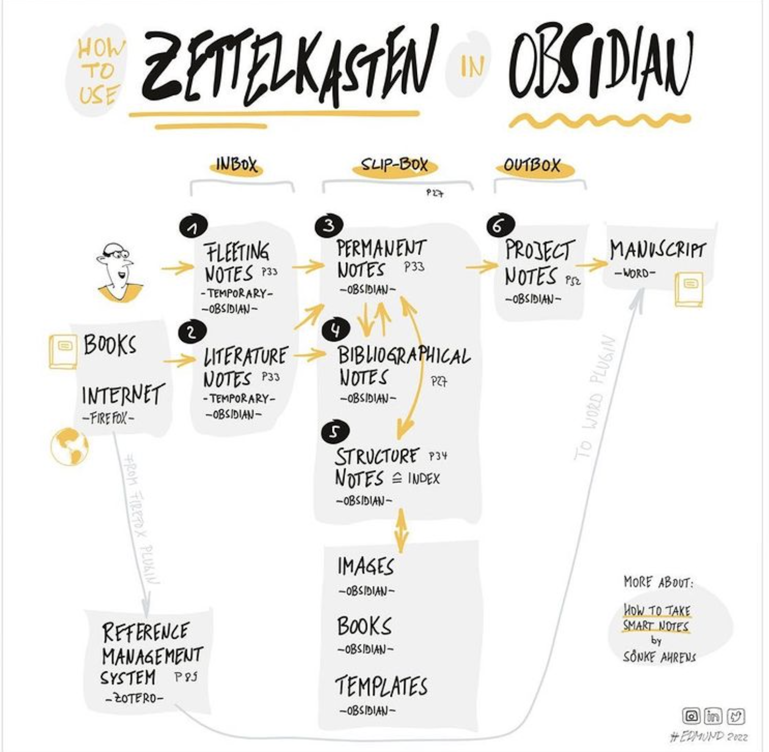
Tools to create Zettelkasten or Digital Gardens in Open-Source Obsidian Publish Alternatives, and Zettelkasten with Obsidian.
Origin: How to Take Smart Notes (Sönke Ahrens)
References: Deep Work, Personal Knowledge Management (PKM), Obsidian